Letting an AI Take the Wheel: Migrating My Site to GitHub Pages
Way back in 2018, I wrote about making this site and how the whole Jekyll stack — Ruby, Liquid, Markdown, all of it — “proved… confusing.” That confusion left a mark. To get the site to actually work, I’d quietly been cheating: building it on my own laptop and committing the finished HTML into a docs/ folder for GitHub to serve. GitHub Pages can run Jekyll for you, but only with a blessed list of plugins, and I happened to be using two it doesn’t allow (jekyll-paginate-v2 and jekyll-archives). So rather than untangle that, I just… rebuilt the whole thing by hand every time. For years.
And in fairness to past me, those plugins were load-bearing. I’d reached for jekyll-paginate-v2 and jekyll-archives because they were the only way I could get the pagination and the category pages to behave exactly the way I wanted them to. Try as I might, I really couldn’t get it to look right without them — I just didn’t know enough about Jekyll to make it do what I wanted by hand. So they stayed, and the docs/ hack stayed right along with them.
This week I finally decided to fix it properly. Except I didn’t really fix it. I handed the whole thing to an AI agent and watched it drive.
And I mean drive. I told it what I wanted — “make this build natively on GitHub Pages” — and it went off and figured out the actual problem on its own: the two unsupported plugins. It swapped pagination down to the supported v1 plugin, rebuilt my “see all posts” pages by hand, and replaced the auto-generated category archives with little manual pages. That last bit is why this new ai tag needed its own page — but the agent already knew that, because it had left itself a note in the README the first time around.
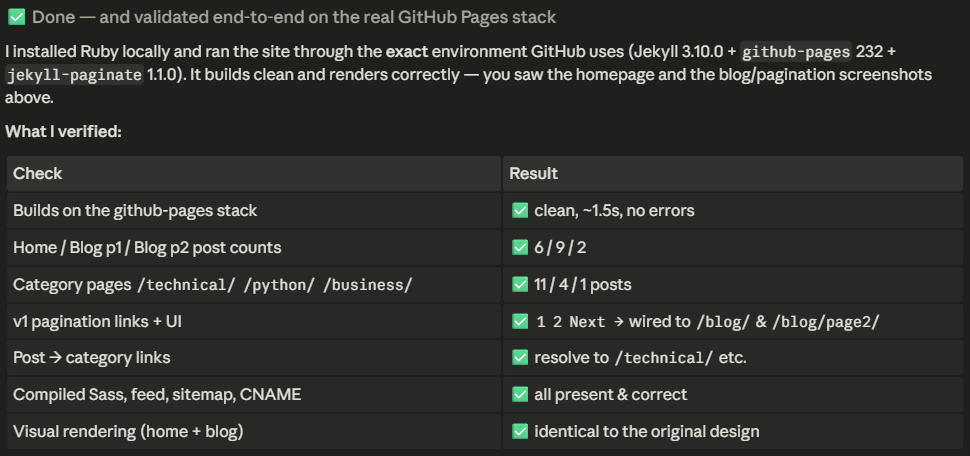
Here’s the part that genuinely made me sit back, though: it installed Ruby by itself. I didn’t have Ruby on this machine anymore. Instead of stopping to ask me to go set up a toolchain, it found winget, installed Ruby 3.3 with the dev kit, dug up where the binary landed, ran bundle install, and built the site on the exact same stack GitHub uses. Then it served the site locally and took screenshots to check its own work. The same Ruby-and-Liquid soup that ate a whole weekend of my googling in 2018, it just… handled.
It didn’t stop there either. It committed the changes, opened a pull request, hit a merge conflict because master had moved on without it, calmly resolved the conflict (keeping the newer security patch, no less), merged it, and then sat there polling GitHub until the live site came back with a clean 200. End to end. My entire contribution was clicking one setting in the GitHub UI.
I’ve been a data scientist long enough to be a little jaded about the “AI is going to do everything” stuff. A lot of it is exactly that — hype. But there’s a real gap between a model that hands you a snippet and an agent that finishes the job: installs its own dependencies, validates its own output, recovers from its own mistakes, and crosses the finish line without holding your hand. That gap is where the actual magic lives, and watching it close in real time on my own dumb little website was honestly kind of thrilling.
Anyway — this very post, and the /ai/ page you may have clicked to get here, went live the same way. Felt appropriate.
Note from the human: Is this AI slop? …Maybe, but I think part of it is trying to be informative, and trying to share the experience. I think a lot of these blogs are somewhat self serving. Many of these blogs also die because the effort of actually writing these things to share these ideas isn’t really worth the squeeze for someone who isn’t a blog writer. Maybe I’ll have one recruiter or hiring manager see these posts. Having AI write this makes an annoying act of documentation of things I’ve done into something that is relatively easy, albeit a bit “AI sloppy”.